

 English
 русский
 Español
 简体中文
简体中文
Imagine a vertical machining center with the spindle stopped while the operator swaps a vise, indicates a fixture, and touches off three new tools. Fifteen minutes per changeover seems small until it...
Read More
CNC Pallet System Guide: How Zero-Point Pallet Quick Change Cuts Setup Time
Imagine a vertical machining center with the spindle stopped while the operator swaps a vise, indicates a fixture, and touches off three new tools. Fifteen minutes per changeover seems small until it is multiplied by every job in a week — that is capacity that never appears on the production schedule. The standard fix in high-utilization shops is a CNC pallet system: a precision pallet, a receiver mounted on the machine table, and a zero-point clamping interface. The operator stages the next workpiece on a loading station while the spindle keeps cutting, and the next pallet drops into the same datum with no re-indication.
Here is the conclusion up front: a pallet system does not make the spindle cut faster. It makes the spindle cut longer, and it makes changeover repeatable to a few microns. The rest of this guide explains how the technology works, where the real savings come from, and how to choose a system that fits your shop.
What Is a CNC Pallet System?
A CNC pallet system is a two-part workholding interface. One half — the pallet — carries the workpiece, vise, or tombstone. The other half — the receiver, foundation plate, or coupling — is fixed to the machine table. When the pallet is loaded, locating elements align it to a defined zero point, and a clamping element locks it in place. Because the pallet returns to the same mechanical reference on every cycle, the offset values measured on the first part remain valid for every subsequent part.
Most modern systems use zero-point clamping as the locking core, which is why "CNC pallet system" and "zero-point pallet system" are often used interchangeably. In practice, a complete system has five functional groups:
| Component | Role in the system |
|---|---|
| Pallet plate | Stable datum that carries the workpiece or fixture |
| Coupling / receiver | Machine-side interface that accepts and locks the pallet |
| Zero-point locators | Align and clamp the pallet to a fixed position, typically within 0.005 mm |
| Base plate | Multi-station carrier for 2, 4, 6, or 8 pallet positions |
| Accessories | Locating pins, pullers, protective plugs, bolts, and sensors |
Why Setup Time and Repeatability Decide the ROI
Start with the two numbers that determine whether a pallet system pays for itself: setup time per changeover and clamping repeatability.
A conventionally clamped fixture can take 15 to 45 minutes to change and re-indicate. A pallet-based changeover takes less than two minutes, and a well-designed zero-point system has been shown to reduce setup time by up to 90%. The most visible effect is on short-run work: more batches fit into a shift, and one operator can run two or three machines because the work is staged off-line.
The second number is clamping repeatability. A pallet that returns to the same position within 0.005 mm allows the machine to reuse existing offsets, tool length values, and inspection results. Rework from misaligned setups disappears, and first-part inspection becomes a confirmation instead of a hunt.
≤ 2 min
Changeover time per pallet, vs 15-45 min for conventional fixtures
±0.005 mm
Re-clamping accuracy of zero-point locators
Up to 90%
Setup time reduction in batch machining
A pallet system does not make the spindle cut faster. It makes the spindle cut longer — and that is where the real gain lives.
Inside a CNC Pallet System: Components That Matter
Not all pallet systems are built the same way. The practical difference is in the interface: how the pallet is guided, locked, and released. These components carry most of the engineering weight.
Pallet quick-change couplers and tray adapters
For automated cells and robot-loaded machines, the interface is usually a two-piece quick-coupler set. The coupler mounts on the machine table or loading station, and the tray adapter mounts under the pallet. When they mate, a taper or cone guides the pallet into position, then a ball lock or clamping ring pulls it tight. The exchange can be performed by an operator or a robot without manual torqueing or alignment.
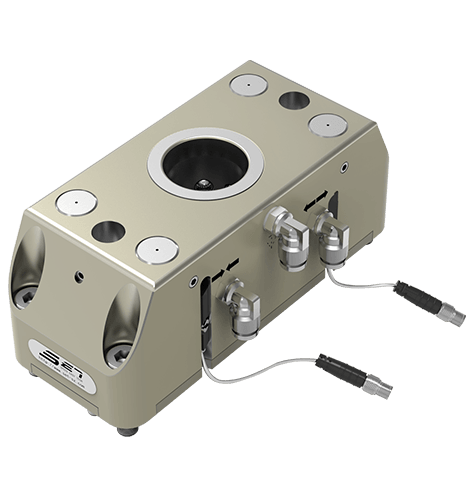 Pneumatic Unlock Mechanical Clamp Zero-Point Coupling UnitThis quick-coupler set suits automated cells and robot-loaded machines. It guides pallets into position and locks mechanically, with a 0.02 mm repeatable accuracy and built-in detection interfaces for reliable automated exchange.View Product →
 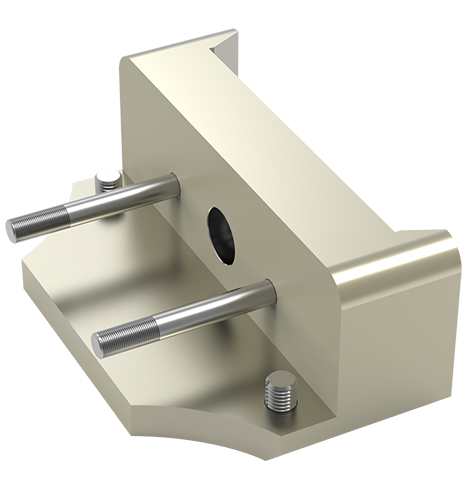 Compact Alumina Tray Adapter for Robotic Pallet HandlingDesigned to mate with the manipulator coupling, this lightweight adapter maximizes space use and supports automatic multi-axis robot handling. Its short-cone ball-lock interface ensures repeatable positioning for quick fixture changeover.View Product →
Zero-point base plates and pallet plates
For machining-center work, a base plate with multiple zero-point modules gives the shop a permanent grid of reference positions. Pallet plates — named by station count, such as 2GWTP or 4GWTP — bolt onto the same grid, and different pallets with different fixtures can share one base plate. Locating components can be cleaned or replaced without pulling the base plate off the machine.
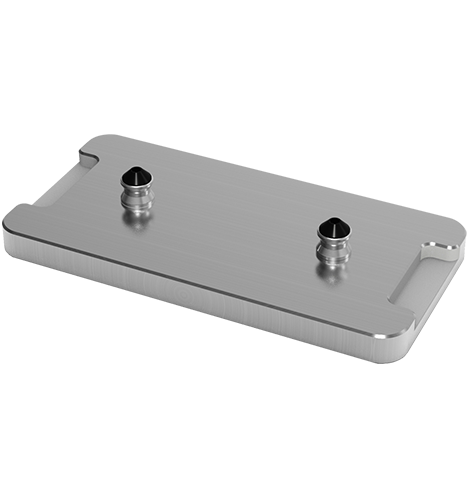 Two-Unit Pallet Plate for Multi-Station Zero-Point GridThis 200 by 100 by 20 mm steel pallet bolts onto a two-unit zero-point base plate, enabling different fixtures to share a common grid. It offers a consistent reference position for machining-center work and supports quick changeovers.View Product →
Manual or Automatic: Matching the System to Your Shop
The choice between manual and automatic pallet systems is not about capability — both provide micron-level repeatability. It is about cycle frequency, worker involvement, and the road to automation.
| Factor | Manual system | Automatic system |
|---|---|---|
| Actuation | Hand lever, ball lock, or pull-down clamp | Pneumatic cylinder with sensor control |
| Changeover time | 30 to 60 seconds | 5 to 15 seconds |
| Best fit | Job shops, one operator, low to mid batch | High-mix cells, robot loading, lights-out runs |
| Investment | Lower entry cost | Higher entry cost, faster automation path |
| Safety | Mechanical self-lock | Self-locking with position feedback |
Manual ball-lock systems are often the right starting point: they are simple, reliable, and do not require an air supply at every station. Automatic systems become attractive when a robot loads the machine or when the machine runs unattended. In both cases, choose a design with a self-locking clamping function so the pallet cannot release under cutting vibration or interrupted cuts.
How to Choose a CNC Pallet System
Use these six criteria to short-list pallet systems before comparing prices:
- Workpiece envelope and weight. The pallet must carry the fixture and part inside the machine envelope without overhang or collision potential.
- Machine table and spindle configuration. Rotary axes, tombstones, and fourth/fifth-axis modules change where the receiver can be mounted.
- Number of pallets in circulation. More pallets mean more off-line setup, but also more storage and handling overhead.
- Actuation method. Decide whether the operator, a robot, or a pallet shuttle will load the pallet.
- Accuracy class. A 0.005 mm class system suits die/mold and precision machining; general machining can work with slightly looser tolerances at lower cost.
- Expansion path. Confirm that the coupler and zero-point locators support additional pallets, tombstones, or a robot cell later.
A practical rule: start with the interface, then build pallets around it. The coupler and locator determine repeatability, changeover speed, and automation compatibility — the pallet is just a carrier.
Where CNC Pallet Systems Pay Off
CNC pallet systems are used across 3-axis, 4-axis, and 5-axis machining, but the return is largest where conventional setup is slow or physically demanding. On a horizontal machining center, heavy tombstones and multi-sided fixtures make changeover long — a horizontal machining center zero-point setup keeps the tombstone on the machine and changes pallets instead. Large vertical lathes, welding fixtures, and presetting stations follow the same logic: keep the reference fixed, exchange the carrier.
Typical setup points in a CNC pallet workflow:
3-axis zero-point quick change 4-axis and 5-axis quick change Horizontal machining center 1 to 6 m vertical lathe Automotive welding automation Pre-set and 3D inspection stations
CNC Pallet System FAQ
Q1: How much time can a CNC pallet system save per job change?
In typical batch machining, a pallet change takes under two minutes, compared with 15 to 45 minutes for a conventional fixture change with indication. Combined with off-line staging, shops frequently report 50 to 90% setup time reduction, depending on batch size and fixture complexity.
Q2: What is the difference between a CNC pallet system and a zero-point system?
A pallet system is the complete workflow: pallets, receiver, base plate, and loading station. A zero-point system is the precision clamping core inside it — the locators and locking modules that give the pallet its repeatable datum. Most modern pallet systems use zero-point clamping as that core.
Q3: Can I retrofit a pallet system to an existing CNC machine?
Yes. Base plates and receivers mount directly on standard T-slots or on a sub-plate with minor preparation. The main checks are table size, Z-axis clearance, and whether the added pallet height reduces the machining envelope.
Q4: How should the pallet interface be maintained?
Keep the taper, ball seats, and locating surfaces clean, install protective plugs when a coupler is empty, and inspect locator pins and pullers for wear as part of routine maintenance. This keeps re-clamping accuracy at the rated value for years.
Start With the Interface, Not the Hardware
The fastest way to turn a CNC pallet system into a money-saving process is to standardize the interface first. Choose a receiver and zero-point locator that match your workpiece weight and accuracy class, then build pallets, tombstones, and fixtures for the jobs you actually run. When the job list changes, the pallets change — but the datum, the changeover routine, and the operator's habits stay the same. That consistency is what pays for the system.
latest news

- CNC Pallet System Guide: How Zero-Point Pallet Quick Change Cuts Setup Time
- Pneumatic Workholding Solutions: How to Cut Your CNC Setup Time and Errors
- Machine Tending Tools: How Quick-Change Grippers and Zero-Point Systems Cut CNC Downtime
- Machine Tending Fixtures: Key Factors Behind a Stable CNC Machining Cell
Latest news
-
Pneumatic Workholding Solutions: How to Cut Your CNC Setup Time and ErrorsWorkholding is often the hidden time thief in a machining shop. A part that takes three minutes to clamp can turn a 30-second cycle into a 3-minute event, and across a shift that drains every hour of...Read More
-
Machine Tending Tools: How Quick-Change Grippers and Zero-Point Systems Cut CNC DowntimeA production manager watches the clock. The spindle stops, the operator walks over, waits for the table to unclamp, swaps a fixture, re-clamps, and starts the next part. That scene repeats several ti...Read More
-
Machine Tending Fixtures: Key Factors Behind a Stable CNC Machining CellThe night shift operator calls maintenance before the robot has run for an hour. The arm comes down to the same teach point every cycle, but the part is 0.03 mm off in the fixture. Within minutes the...Read More
-
5-Axis Workholding: How Zero-Point Systems and Vises Maximize Machining StabilityA five-axis machining center is only as good as the workholding that supports it. A fixture that blocks the rotary table or interferes with the cutter path turns a five-axis machine into a three-axis...Read More
-
How Do Locating and Alignment Accessories Define CNC Machining Accuracy?Introduction: The Hidden Cost of Misalignment In CNC machining, the difference between a high-value precision component and a scrap part often comes down to a fraction of a millimeter. While spindles...Read More
Contact Details
- Address: 1-4 Floors, 17#03, Building 17, No. 269, Xinfeng Road, Xukou Town, Wuzhong District, Suzhou City
- Fax: +86-18112607008
- Tel: 18112607008
- Email: [email protected]
Mobile terminal
Copyright © SET Industrial | Zero-Point Positioning & CNC Workholding ALL RIGHTS RESERVED.